Getting photos in
How to make a photo book from iPhone photos
To make a photo book from iPhone photos, open Photouria in Safari on the phone and add photos straight from your camera roll, about 50 at a time. For a whole library, export it from the Photos app on a Mac or download it from iCloud and add that instead. Photouria then organises the photos, finds every photo of the people you love, and lays out a linen hardcover book you can change before printing.
There is no app to install. Building the book is free and needs no account, and printing costs from NZ$149 with shipping included.
What are the ways to get iPhone photos in?
An iPhone library usually lives in three places at once: on the phone, in the Photos app on a Mac, and in iCloud. Each has its own way in, and the right one depends on how many photos you are bringing.
| What you do | Best for | |
|---|---|---|
| On the iPhone | Open Photouria in Safari and pick from your camera roll, about 50 at a time | A trip, a year, or a few hundred photos you can find by scrolling |
| From a computer, with the phone in your hand | Start on the computer, scan the code it shows, and send photos from the phone | Editing the book on a big screen while the photos are still on the phone |
| From a Mac | Export originals from the Photos app into a folder, then add the folder | Thousands of photos in one go |
| From iCloud | Download the photos at iCloud.com, then add the zip files as they are | A whole library when you are on a Windows computer or a borrowed one |
How do you add photos straight from the iPhone?
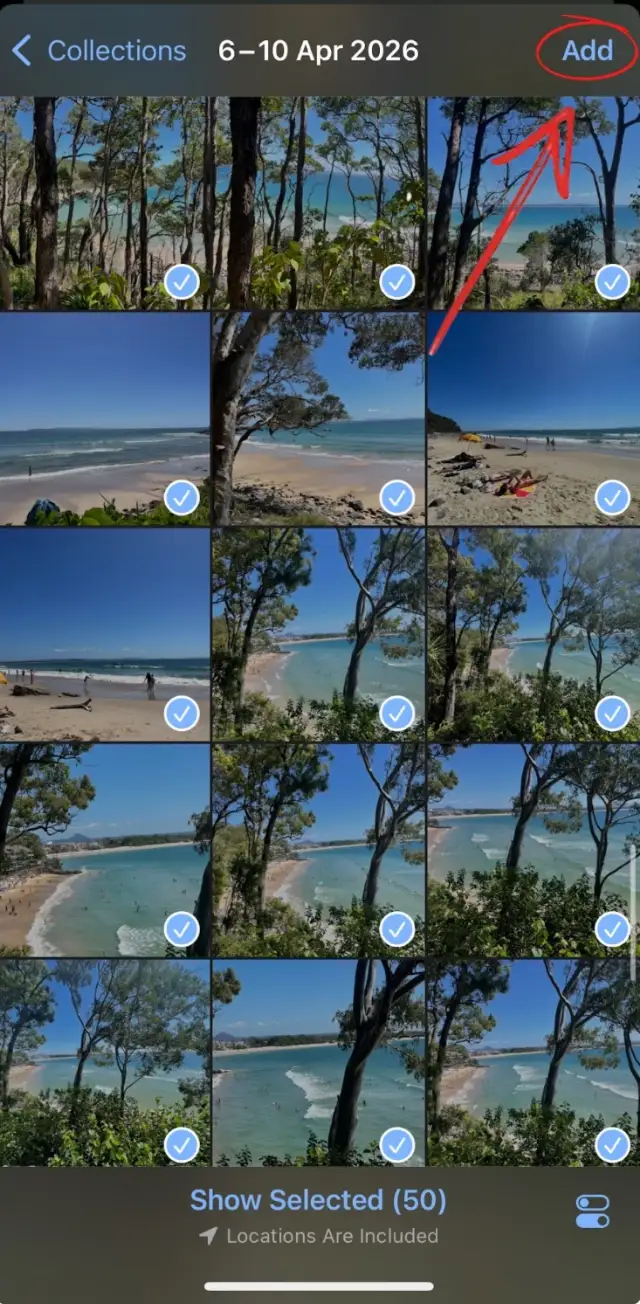
1. Open Photouria in Safari and start a book
Go to photouria.com on the phone and start a book. It runs in the browser, so there is nothing to download from the App Store.
2. Pick about 50 photos at a time
Choose to add photos from this phone, tick the ones you want, and tap Add once. About 50 at a time works best on a phone. Nothing stops you going over, and coming back for more is the normal way to do it: the total keeps climbing with each pick.
3. Give the phone a moment
After you tap Add, your phone takes a moment to hand the photos over. That pause is normal, and it is longer on a big selection.
4. Keep going, or stop there
Add another batch, or carry on to the book with what you have. You can add more photos later.
How do you send a whole library from a Mac?
If your iPhone photos sync to a Mac, the Photos app there is the fastest way to move a lot of them.
- Open Photos on the Mac and select the photos you want.
- Choose File, then Export, then Export Unmodified Originals.
- Export into a new, empty folder.
- In Photouria on the Mac, add that folder. A folder can hold thousands of photos, and folders inside it are included.
How do you bring photos in from iCloud?
This works on any computer with a browser, which makes it the route for a Windows computer.
- Sign in at iCloud.com and open Photos.
- Select the photos and download them. If iCloud offers a format, choose Unmodified Originals.
- A big selection comes down as several zip files, one after another. Take every one: a missing zip is a missing part of the library.
- Add the zip files to Photouria as they are. There is no need to unzip them.
On Windows there is a second option: install iCloud for Windows, turn on Photos, and add the iCloud Photos folder it creates.
What happens after the photos are in?
The same thing whichever way they arrived. Photouria automatically organises your photos and groups the people in them. You say what the book is about, such as one person, a trip or a year, and how many photos you want in it. It chooses the photos, lays out the pages in the order they were taken, and shows you the whole book. You can swap photos, remove pages and add captions before you order.

What does it cost, and where does it ship?
NZ$149 covers up to 30 photos, then NZ$10 for every 10 more, capped at NZ$219 from 91 photos up. Prices are in New Zealand dollars wherever the book is going, and shipping is included.
We ship to New Zealand, Australia, the United States, Canada, the United Kingdom and most of Europe. Delivery usually takes 4 to 13 business days from the day you order.
Every Photouria book is the same object: a Lulu linen hardcover, woven linen over hardcover boards, your title foil stamped on the spine, and a printed dust jacket over the top. There are six sizes, from 14 × 22 cm up to A4 at 21 × 30 cm, and six linen colours. Inside, photos print on 80lb coated paper with a matte finish, and a book can run from 24 pages up to 800.
Questions about iPhone photos
Do I need to install an app?
No. Photouria runs in the browser on an iPhone, an iPad, a Mac or a Windows computer.
Does it work with HEIC photos?
Yes. Photos in the format an iPhone saves by default are accepted as they are. You do not need to convert them first.
How many photos can I add at once from an iPhone?
About 50 at a time works best on a phone, and you can come back for more as many times as you like. For thousands at once, use a Mac folder or an iCloud download instead.
Why does my iPhone pause after I tap Add?
The phone is preparing the photos you chose before it hands them over, and fetching any that are stored in iCloud rather than on the phone. The pause is longer on a big selection.
Can I start on my phone and finish on a computer?
With a free account, yes: sign in on both and your photos are there. You can also start on the computer and send photos from the phone by scanning the code it shows.
Does this work on an Android phone too?
Yes. Adding photos from the phone works the same way in an Android browser. If your photos are in Google Photos, there is a guide to bringing those in.
How much does the printed book cost?
NZ$149 covers up to 30 photos, then NZ$10 for every 10 more, capped at NZ$219 from 91 photos up. Prices are in New Zealand dollars wherever the book is going, and shipping is included.